What’s in this guide
- Before You Start: Identify Your Hot Spring Model
- How to Unlock a Hot Spring Control Panel
- Quick Diagnostic — Spa Lock, Temp Lock, or Protection Mode?
- Advanced Troubleshooting When the Panel Still Won't Unlock
- Understanding Your Hot Spring Spa Control Panel
- Essential Hot Spring Spa Maintenance Tasks
- How to Unlock Control Panels on Other Hot Tub Brands
- Limitations and When to Call a Professional
- Frequently Asked Questions
- The Fastest Fix Starts with the Right Diagnosis
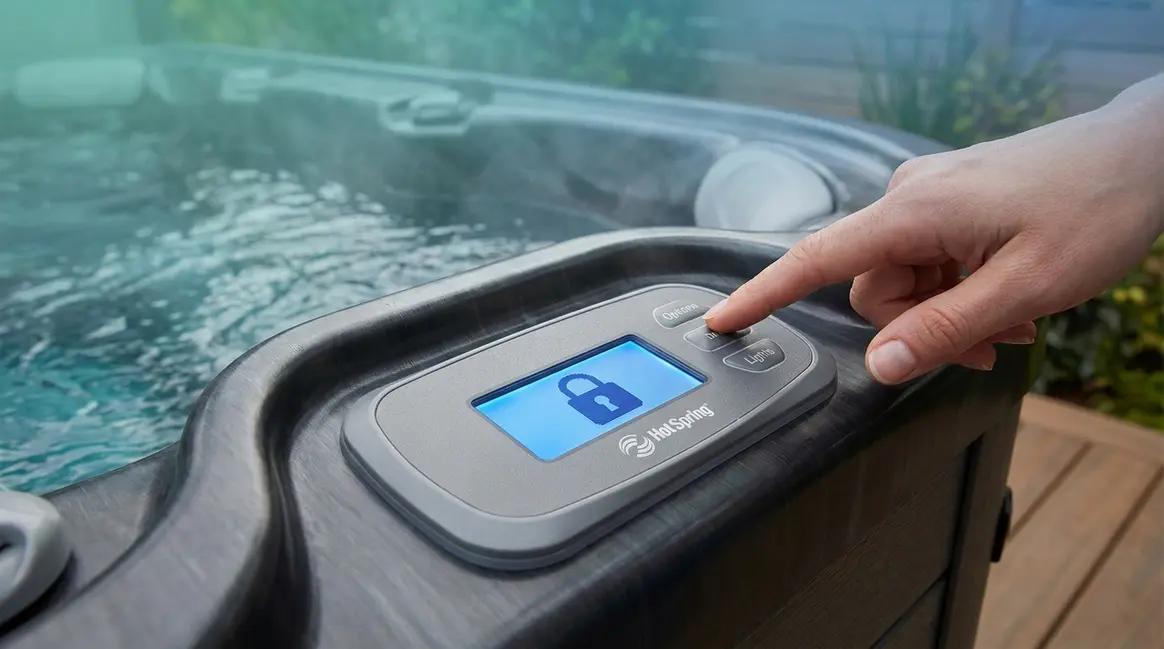
You’re ready to relax, but your Hot Spring spa control panel shows a padlock icon and won’t respond to anything you press. That single locked symbol can stop an entire evening — and it happens to Hot Spring owners far more often than the manual suggests.
Most frustrated owners make one of two mistakes: they call a technician right away (an expensive mistake for a 30-second fix) or they randomly press buttons and accidentally activate a second lock on top of the first. Knowing how to unlock your Hot Spring hot tub panel correctly — the first time — saves you both money and stress.
By the end of this guide, you’ll know the exact button combination for your specific Hot Spring model so you can unlock your panel in under two minutes, without a service call. Here’s the plan: first identify your model and panel type, then follow the matching step-by-step unlock sequence, and finally use the diagnostic framework below if the standard fix doesn’t immediately work.
Learning how to unlock hot spring hot tub panel interfaces takes under two minutes once you know which of the three lock types you’re dealing with.
- Highlife & Limelight (2010–present): Press and hold Options + Lights together for 3–4 seconds to clear Spa Lock.
- Older Models (1997–2009): Press and hold Light “–” + Temp “–” simultaneously for 4 seconds.
- Hot Spot / Solana: Use the SET button to navigate to TOOLS → SPALK and press Temp ▼ to turn it off.
- The Three-Lock Framework is your fastest diagnostic tool: Spa Lock, Temperature Lock, and Protection Mode each require a different fix.
Before You Start: Identify Your Hot Spring Model
Before figuring out how to unlock hot spring hot tub panel systems, applying the wrong unlock sequence wastes time and can layer on additional confusion. Spend 60 seconds identifying your exact model and panel type first — every step after this becomes much faster. If you’re new to spa ownership, exploring essential tips for first-time hot tub owners can help you familiarize yourself with these components.
How to Find Your Hot Spring Model Name
Your model name is printed on a sticker inside the equipment compartment door (the side panel that opens to reveal the pump and heater). It typically reads something like “Highlife Envoy,” “Limelight Flair,” “Hot Spot Relay,” or “Solana.” You can also find it in your original purchase paperwork or on the official Hot Spring owner’s manuals page.
If you cannot open the equipment door because the panel is fully locked, check the top edge of the spa shell near the water’s edge — some models have a smaller label there. Once you have the model name, you’re ready to match it to the correct unlock sequence below.
The Four Main Panel Types at a Glance
Hot Spring uses four distinct control panel styles across its lineup. Each looks different and requires a different unlock method. Our team reviewed manufacturer documentation and owner forum reports to confirm these distinctions.
| Panel Type | Models | Key Visual | Unlock Method |
|---|---|---|---|
| Modern button panel | Highlife, Limelight (2010–present) | Physical Options & Lights buttons, small LCD | Options + Lights hold |
| Older front-side panel | Highlife, Limelight, Hot Spot (1997–2009) | Rocker-style buttons on the spa side | Light – + Temp – hold |
| SET button panel | Hot Spot, Solana (2010–2019) | SET button with on-screen TOOLS menu | SET → TOOLS → SPALK |
| Wireless touchscreen | Select Highlife NXT, 2010+ wireless | Floating touchscreen remote, gear icon | Settings menu → Spa Lock |
Identify which panel matches yours before moving to the next section.
How to Unlock a Hot Spring Control Panel
Estimated Time: 2 minutes
Tools Required: None
The exact button sequence depends entirely on your model line and panel generation. Below are four verified unlock procedures drawn from Hot Spring’s official owner’s manuals and confirmed by dealer training documentation. Follow only the section that matches your panel type. If you need a broader overview, you can learn how to unlock your Hot Springs spa control panel using our general guide.
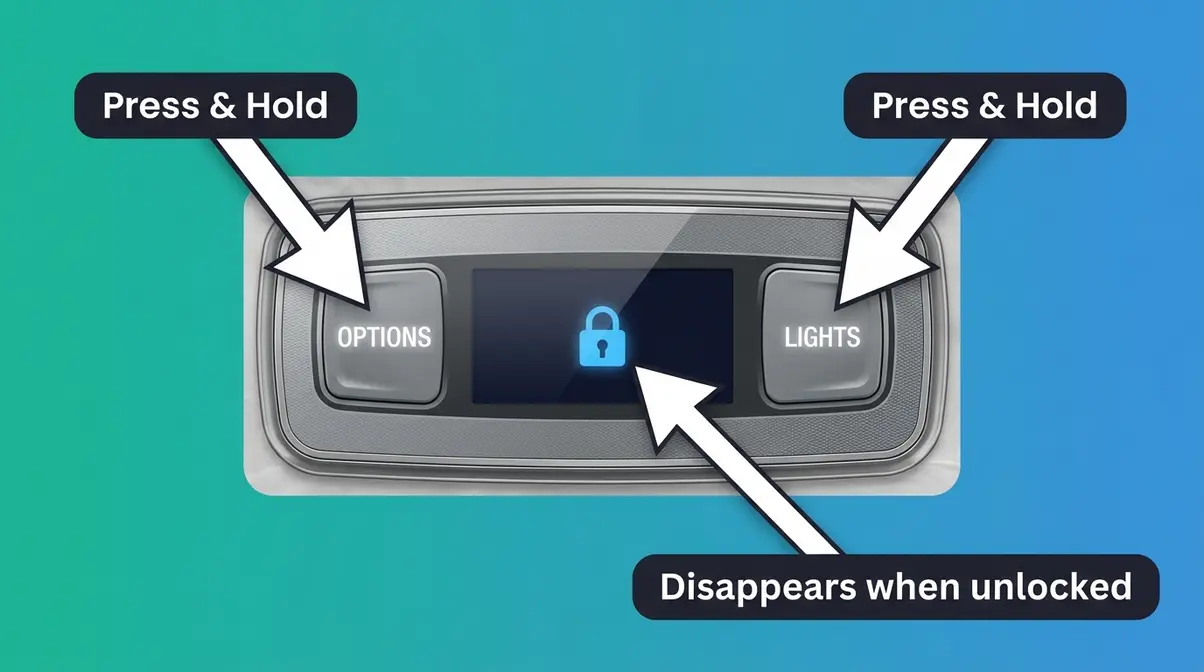
Highlife and Limelight Models (2010–Present): Hold Options + Lights
This is the most common unlock situation Hot Spring owners encounter. According to dealer-verified troubleshooting documentation, the Spa Lock (the full panel lock that makes all buttons unresponsive) is cleared with a single two-button hold.
What you’ll need: Just your hands. No tools required.
- Locate the Options button — it’s a physical button on the left side of your topside panel (the control panel, which is the flat surface mounted on the spa shell near the water).
- Locate the Lights button — it sits to the right of Options on the same panel row.
- Press and hold both buttons simultaneously for 3–4 seconds. Count slowly in your head.
- Watch the display — the padlock icon (🔒) will disappear and your screen will return to the normal temperature display.
- Test one button (try Jets or Lights) to confirm the panel is responding again.
What you’ll see if it worked: The padlock icon vanishes and the jets or lights respond immediately to your next press.
What you’ll see if it didn’t work: The padlock icon stays on screen. If this happens, your spa may be in Temperature Lock or Protection Mode instead — jump to the Quick Diagnostic section below.
“The cogwheel icon on the bottom left has the Spa lock/temp lock options to turn it on or off if I remember correctly.”
— Hot Spring owner, community forum
This is a real description of the cogwheel icon (⚙️), which appears on newer touchscreen-style panels in the same model lines. If your panel has a gear symbol rather than physical buttons, tap that icon first, then look for the Spa Lock toggle inside the menu.
Older Hot Spring Models (1997–2009): Hold Light – and Temp –
Pre-2010 Hot Spring spas use rocker-style buttons on the side of the spa rather than a topside panel. The unlock method is different — and no competitor guide covers it. According to Prescott Spas’ verified demonstration for this exact era of Hot Spring spa, the two-button hold uses the minus (down) versions of the Light and Temperature buttons.
- Find the Light “–” button — the downward rocker on your Light control. It lowers brightness or turns lights off.
- Find the Temp “–” button — the downward rocker on your Temperature control. It normally lowers the set temperature.
- Press and hold both “–” buttons at the same time for approximately 4 seconds.
- Release when the lock icon disappears from the small display window.
- Press Jets to confirm the panel is now responding.
What you’ll see if it worked: The padlock indicator clears and the jets engage when pressed.
What you’ll see if it didn’t work: Nothing changes on the display. On these older panels, an unresponsive result after this step usually indicates a tripped GFCI breaker (Ground Fault Circuit Interrupter — the safety switch in your electrical panel that cuts power if it detects a fault). See the Advanced Troubleshooting section.
Hot Spot and Solana Models: The SET Button Method
Hot Spot and Solana models from roughly 2010–2019 use a dedicated SET button that opens an on-screen TOOLS menu. The Spa Lock and Temperature Lock are both controlled through this menu, according to the 2013 Hot Spot Owner’s Manual.
To unlock Spa Lock (SPALK):
- Press the SET button on your panel. The display changes from the temperature reading to a menu screen.
- Press SET again to scroll through the submenu options until you see SPALK on the display (this stands for Spa Lock).
- When SPALK is highlighted, press the Temp ▼ (down) button to deactivate it. The display should change from SPALK+ to SPALK–.
- Wait 2 seconds. The panel exits the menu and returns to normal operation.
- Press Jets to confirm the panel responds.
To unlock Temperature Lock (TLOK) separately:
- Press SET until TLOK appears on screen.
- Press Temp ▼ to switch it from TLOK+ (locked) to TLOK– (unlocked).
- The panel returns to normal; temperature adjustments now work again.
What you’ll see if it worked: The SPALK or TLOK indicator changes from “+” to “–” and the lock icon clears from the main display.
Wireless Control Panels (2010+): Unlock via Settings Menu
Some select Highlife NXT models and newer wireless panels use a floating touchscreen remote rather than a fixed topside panel. The unlock process moves through an on-screen settings menu rather than a physical button hold, as shown in dealer NXT panel documentation.
- Wake the wireless panel by tapping anywhere on the screen if the display is dark.
- Tap the gear icon (⚙️) — the cogwheel symbol — usually located in the bottom-left corner of the touchscreen.
- Scroll through the settings menu until you see Spa Lock listed as an option.
- Press and hold the On/Off toggle next to Spa Lock for 3–4 seconds until it switches from On to Off.
- Tap the back arrow to return to the main screen. The padlock icon should be gone.
- Test the panel by adjusting the temperature up or down.
What you’ll see if it worked: The padlock icon disappears from the main display and all controls respond normally.
If your wireless remote is completely unresponsive (black screen, no response to tapping), the issue may be a dead battery or an out-of-range signal rather than a software lock. See Step 2 in the Advanced Troubleshooting section.
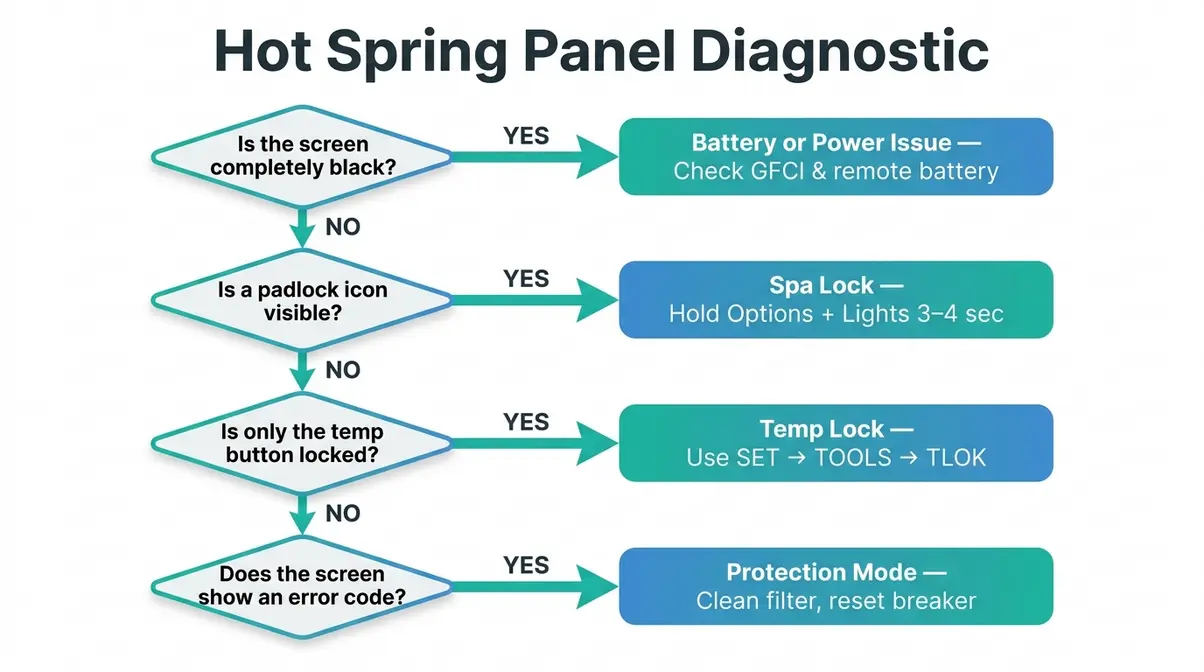
Quick Diagnostic — Spa Lock, Temp Lock, or Protection Mode?
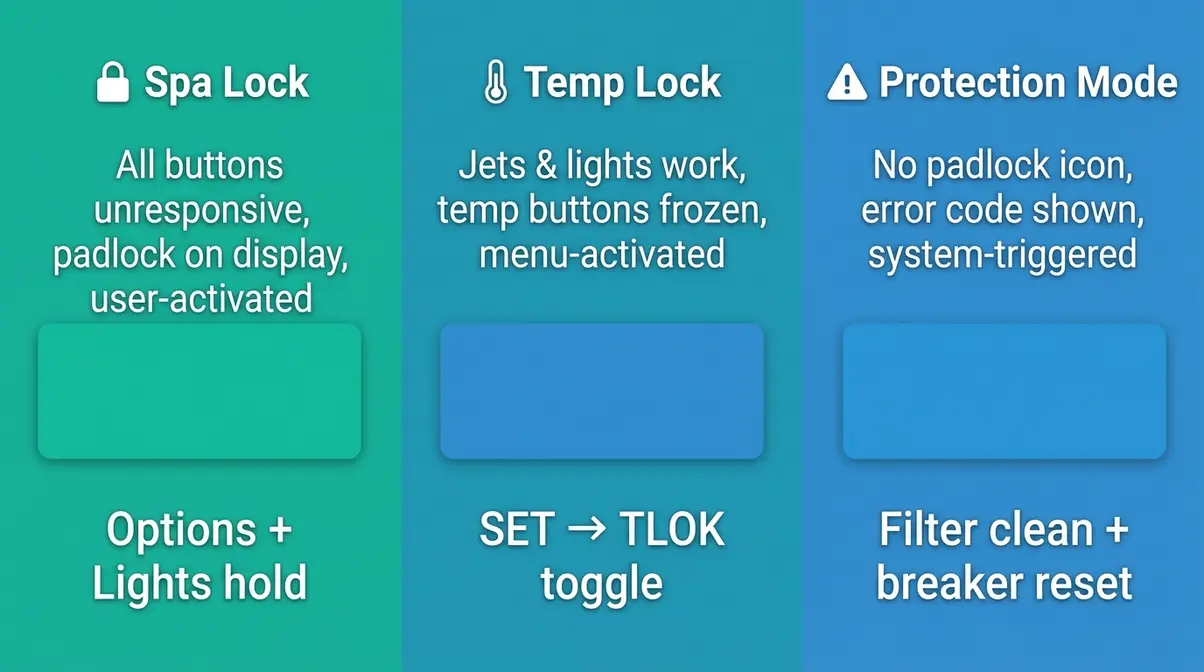
The Three-Lock Framework is a diagnostic approach designed to help Hot Spring owners instantly distinguish between three completely different locked-panel situations that look similar on screen but require different fixes. Applying the wrong solution wastes time and occasionally makes the situation harder to clear. Hot Spring owners consistently report confusion between these three states — and competitor guides almost universally treat them as the same problem.
The Three-Lock Framework identifies your lock type in under 30 seconds. Ask yourself: Can I press Jets and Lights but not change temperature? Or is nothing working at all? Or is the spa displaying an error code?
Spa Lock (Padlock Icon) — What It Means and How to Clear It
Spa Lock is a user-initiated feature that disables all control panel buttons to prevent accidental changes — useful when children are around or when you want the spa to maintain its current settings undisturbed. You (or someone else) intentionally activated it, whether or not you remember doing so.
How to identify it: A padlock icon (🔒) appears on the display. Pressing any button — Jets, Lights, Temperature — produces no response at all.
How to clear it: Use the model-specific button sequence from the step-by-step section above. For most 2010+ models, that’s the Options + Lights hold for 3–4 seconds.
According to the official Hot Spring troubleshooting guide, Spa Lock is one of the most common reasons an otherwise functional spa appears completely unresponsive. The fix takes seconds once you know the correct sequence.
Temperature Lock (Temp Block) — What It Means and How to Clear It
Temperature Lock (sometimes shown as TLOK or “temp block” on older displays) is a separate, targeted lock that disables only the temperature adjustment buttons. Your jets, lights, and other functions continue to work normally — only the temperature cannot be changed.
How to identify it: Jets and Lights respond normally. Pressing the temperature up or down buttons does nothing, or a small lock symbol appears next to the temperature reading specifically.
How to clear it: On Hot Spot/Solana models, use the SET → TOOLS → TLOK method described above. On newer Limelight panels, press Options, tap the Temperature icon, then tap the top-left temperature button again to toggle the lock off, as confirmed by Hot Tub Spa Supplies’ Limelight documentation.
Temperature Lock is often activated accidentally by owners exploring the Options menu for the first time — the toggle is easy to hit without realizing what it does.
How to Get Hot Spring Spa Out of Protection Mode
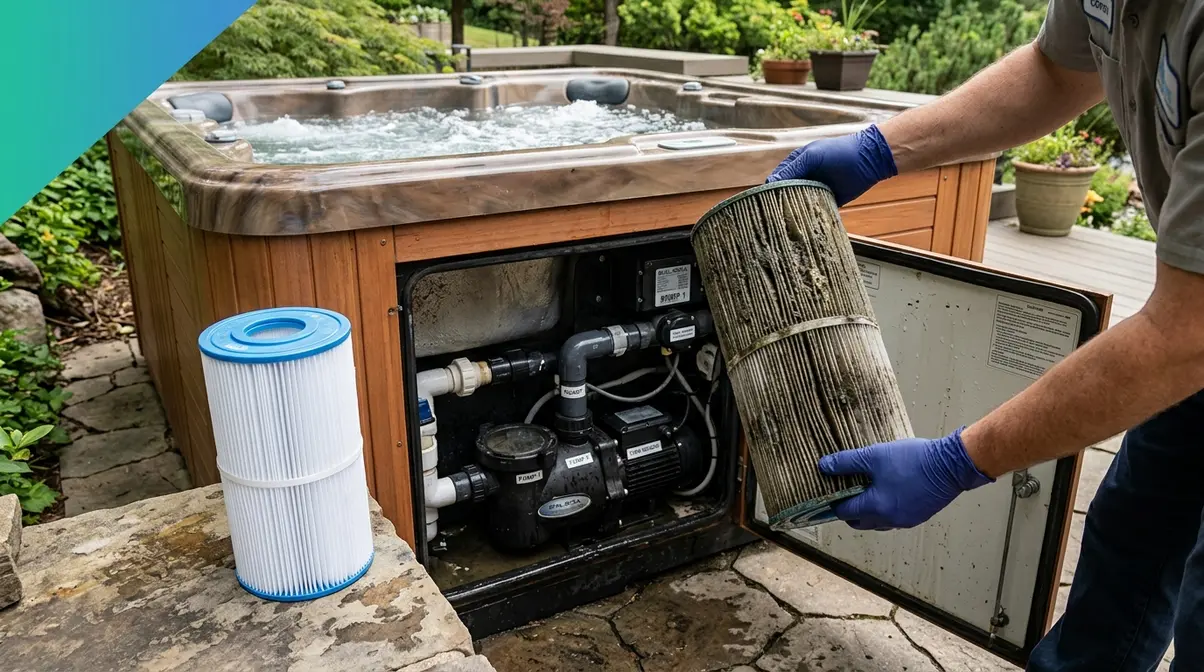
Protection Mode is fundamentally different from Spa Lock and Temperature Lock. It is a system-triggered safety state, not something a user activates intentionally. When your Hot Spring spa enters Protection Mode, it is telling you that the heater has detected a condition — most often a clogged filter reducing water flow — that could damage the heating element or create a safety hazard.
How to identify it: The spa may show an error message on screen. The heater stops working (water stays cold), but the jets may still run. No padlock icon is displayed — instead, you may see a flashing indicator or an error code.
How to clear it (based on dealer-verified procedure):
- Locate the circulation pump filter — usually the one with a gray cap or the standpipe filter you can reach by hand.
- Remove that filter completely and set it aside.
- Turn the spa off at the breaker in your electrical sub-panel.
- Wait at least 20 seconds with the power off.
- Turn the breaker back on with the filter still removed, to allow water to flow freely through the heating system and reset the error.
- Clean or replace the filter before reinstalling it. A dirty filter is the most common trigger for Protection Mode.
Hot Spring owners consistently report that Protection Mode clears after this filter-and-reset procedure, as documented in dealer troubleshooting videos. If Protection Mode returns within a few days, your filter needs replacing rather than just cleaning.
Advanced Troubleshooting When the Panel Still Won’t Unlock
If the standard unlock sequences above didn’t resolve your issue, work through these three steps in order. Each addresses a distinct failure mode that the basic unlock process cannot fix.
Step 1 — Perform a GFCI Breaker Reset
A GFCI breaker (Ground Fault Circuit Interrupter — a safety switch in your electrical panel that cuts power if it detects a potential shock hazard) is the most common reason a Hot Spring panel appears completely dead even after you’ve tried the correct unlock sequence. When the GFCI trips, the spa loses power entirely and no button combination will work.
How to reset it:
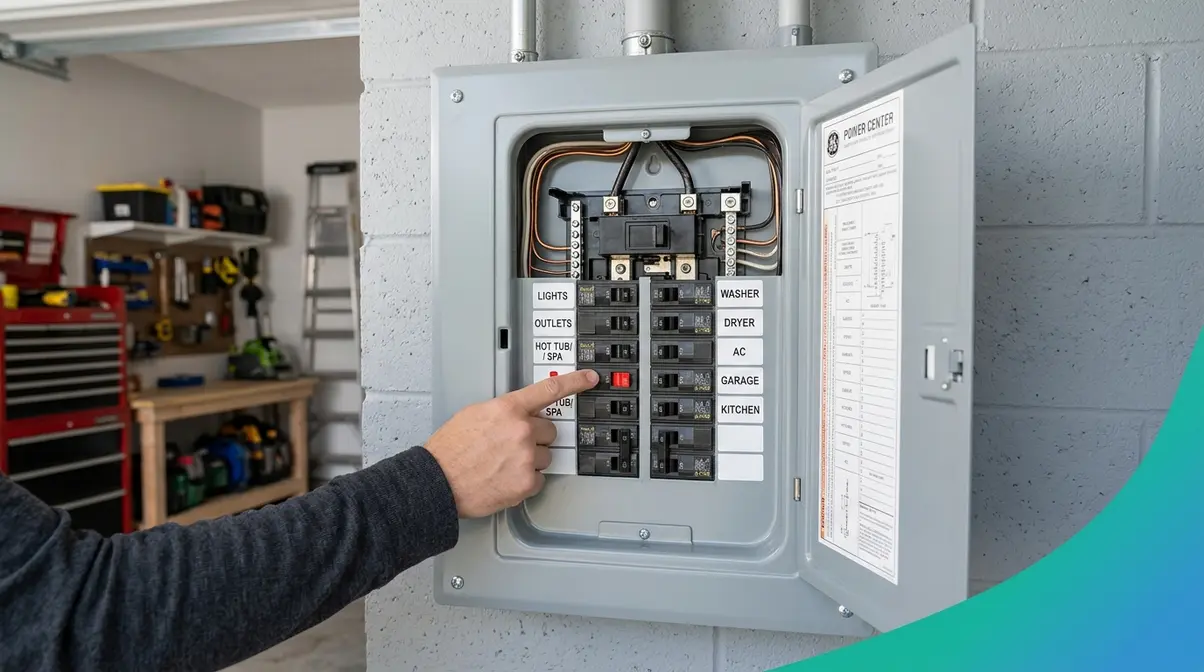
- Go to your home’s electrical sub-panel — often located near the spa or in the garage. Look for a breaker labeled “Hot Tub” or “Spa.”
- Check if the breaker is in the middle (tripped) position rather than fully On or fully Off. A tripped GFCI sits in a middle position and sometimes has a small red indicator button.
- Push the breaker firmly to Off, then push it firmly back to On.
- Return to your spa and wait 30–60 seconds for the control panel to boot up.
- Try the unlock sequence again for your model.
According to Hot Spring’s official troubleshooting guide, an unresponsive panel is frequently caused by an activated Spa Lock or a tripped GFCI — addressing both in sequence resolves the vast majority of locked or dead-panel situations without a service call.
Important safety note: If the GFCI trips again immediately after resetting, do not reset it a second time. A GFCI that won’t hold indicates a real electrical fault. Leave the breaker off and contact a licensed electrician or Hot Spring service technician. The U.S. Consumer Product Safety Commission requires GFCI protection on all hot tub installations precisely because water and electricity create serious shock hazards.
Step 2 — Fix Wireless Remote Issues (Dead Battery, Out of Range)
If you have a wireless control panel (floating touchscreen remote) and the screen is completely black or the remote won’t wake up, the issue is likely a dead battery or an out-of-range signal — not a software lock at all. Many owners spend time trying unlock sequences on what is simply a discharged remote.
Check the battery first:
- Remove the battery cover from the back of the wireless remote.
- Replace the batteries with fresh ones of the same type.
- Hold the remote within 10 feet of the spa and tap the screen.
- If the screen lights up, carry it to the spa’s docking station and let it reconnect.
If the remote won’t pair (connect) to the spa:
- Place the remote on the docking station (the cradle on the spa’s edge) for 60 seconds.
- The remote should automatically re-pair with the spa’s wireless receiver.
- Once paired, the main temperature screen appears and normal controls resume.
Hot Spring wireless remotes from 2010 onward use a short-range radio frequency signal. Walls, distance, and even other wireless devices can interrupt the connection. Pairing (re-establishing the wireless connection between remote and spa) from the docking station almost always restores full function.
Step 3 — When to Call a Hot Spring Service Technician
Most locked-panel situations resolve with the steps above. However, some scenarios genuinely require a trained technician. Calling too early costs money unnecessarily; waiting too long with a real electrical fault is a safety risk. Our team reviewed owner forums and manufacturer documentation to identify the clear thresholds.
Call a technician if:
- The GFCI breaker trips immediately every time you reset it (indicates a wiring fault or ground fault in the spa’s electrical system)
- The control panel display shows error codes that don’t clear after a full power cycle (codes like FLO, OH, or HL indicate sensor or heater failures)
- The panel is physically cracked, has visible water ingress behind the display, or buttons are physically stuck
- Protection Mode returns within 48 hours of clearing it and replacing the filter
- The spa is completely silent with no pump noise even after a confirmed GFCI reset
Do not call a technician for: A Spa Lock, Temperature Lock, or Protection Mode that clears with the steps above. These are normal operational states, not equipment failures, and a service call for them is an unnecessary expense.
Understanding Your Hot Spring Spa Control Panel
Once your panel is unlocked, take two minutes to understand the basic controls. New owners often re-trigger a lock or accidentally activate Protection Mode because they’re unfamiliar with what each button does.
Turning Your Spa On and Off Safely
Many new owners confuse “powering down” the spa with “locking” it — these are completely different actions. Locking the panel (Spa Lock) leaves the spa fully powered and running; it just prevents button inputs. Turning the spa off at the breaker cuts all power. If you need to perform deep maintenance, you must safely turn off your hot tub completely.
For daily use, you do not need to turn your Hot Spring spa off between uses. The spa is designed to run continuously, maintaining your set temperature. Simply leave it running and use the panel to adjust temperature, jets, and lights as needed.
To safely power down for maintenance or winterization: turn the spa off at the GFCI breaker in your electrical panel. Always consult your model’s owner’s manual before draining or performing internal maintenance.
Adjusting Jets, Lights, and Temperature Settings
Now that your panel is unlocked and you understand the basics, here’s what each main button does:
- Jets button: Cycles through jet speed settings (low, high, off). Pressing once activates jets; pressing again increases speed; pressing a third time turns them off.
- Lights button: Toggles the spa’s LED lighting on and off. On newer models, holding the Lights button cycles through color modes.
- Temperature up/down: Raises or lowers your target water temperature in 1°F increments. The spa heats toward the set point automatically.
- Options / Cogwheel icon (⚙️): Opens the settings menu where Spa Lock, Temperature Lock, filter cycles, and display settings are controlled. This is the menu your cogwheel icon leads to.
Essential Hot Spring Spa Maintenance Tasks
Keeping your Hot Spring spa properly maintained prevents the most common causes of locked panels and Protection Mode alerts. Two tasks matter most for first-year owners.
Removing the Side Panel for Internal Access
The side panel (also called the equipment compartment door) gives you access to the pump, heater, and filters. You’ll need to open it for filter cleaning, GFCI breaker access, and any internal inspection. Always ensure your setup meets proper hot tub electrical requirements before opening the panel.
- Locate the side panel latch — usually a small plastic or metal clip on one of the four side panels of the spa shell.
- Press or slide the latch and pull the panel outward. It typically swings or slides free without tools.
- Never remove the side panel while the spa is in Protection Mode without first turning off the breaker. The heater may be in a fault state and re-energizing it during panel removal can cause a fault to worsen.
- Replace the panel firmly after any internal work — loose panels allow moisture and pests into the equipment compartment.
Filling Your Spa and Adding Water Treatment Chemicals
Improper water chemistry is the second most common cause of Protection Mode and heating faults after dirty filters. Hot Spring owners consistently report that balanced water chemistry prevents sensor errors that can trigger system shutdowns. For a complete water refresh, learn how to safely drain and refill your hot tub.
Basic fill procedure:
- Place a garden hose into the filter standpipe (not over the edge of the spa) to fill from the bottom up — this prevents air locks in the pump.
- Fill to the midpoint of the skimmer opening.
- Turn power on at the breaker.
- Add a start-up chemical kit per your dealer’s recommendation before anyone enters the water.
Water chemistry should be tested weekly. Maintain pH between 7.4–7.6 and total alkalinity between 80–120 ppm. Imbalanced water can trigger sensor faults that display as Protection Mode on your control panel.
How to Unlock Control Panels on Other Hot Tub Brands
If you’re troubleshooting a spa that isn’t a Hot Spring, or if a guest’s spa uses a different brand, the unlock process varies by manufacturer. Here are the two most common non-Hot Spring panel systems.
Balboa Control Panels (TP2 and TP7 Series)
Balboa panels are used by dozens of hot tub brands under different names — if your spa isn’t a Hot Spring but has a digital control panel, there’s a good chance it runs Balboa electronics. According to Balboa Water Group’s official TP2 series documentation, the unlock sequence is consistent across the TP-series lineup.
To unlock a Balboa TP2 or TP7 panel:
- Press and hold the TEMP button (or the WARM/Up button if your panel has separate Warm and Cool buttons).
- While holding TEMP, press the LIGHT button twice (two slow, deliberate presses).
- The display briefly shows “UNLK” — release the buttons.
- The panel returns to normal operation.
This sequence works from any locked screen on TP-series panels, per Balboa’s own documentation.
Jacuzzi, Caldera, and Bestway Hot Tubs
Each of these brands uses a proprietary control system, but the unlock logic is similar across all three: find the settings or menu button, navigate to the lock option, and toggle it off.
- Jacuzzi: Press and hold the Mode button for 5 seconds. If a padlock icon appears, the panel is in Child Lock mode — hold Mode again to clear it.
- Caldera: Caldera spas (made by the same parent company as Hot Spring) often share similar panel logic. Try the Options + Lights hold method first, as many Caldera models use comparable electronics.
- Bestway (inflatable spas): Press and hold the Power button for 3 seconds to toggle the child lock on or off. The lock icon appears and disappears on the LED display.
If none of these work, locate your model number on the underside of the control panel and search for the specific owner’s manual on the manufacturer’s website.
Limitations and When to Call a Professional
Common Pitfalls
Pitfall 1 — Pressing random buttons when the panel is locked. When Spa Lock is active, pressing multiple buttons in quick succession does nothing to clear the lock and can occasionally trigger a second lock mode on older models. Stop pressing buttons and follow the specific sequence for your model.
Pitfall 2 — Resetting the GFCI more than once. A GFCI that trips immediately after reset is protecting you from a real electrical hazard. Resetting it repeatedly bypasses that protection. Reset it once; if it trips again, leave it off.
Pitfall 3 — Confusing Protection Mode with Spa Lock. Protection Mode shows no padlock icon — it shows an error state or heating failure. Attempting the Spa Lock button sequence on a spa in Protection Mode accomplishes nothing and delays the actual fix (filter cleaning and power reset).
Pitfall 4 — Ignoring a dirty filter. Hot Spring owners consistently report that Protection Mode returns every few weeks when the filter hasn’t been cleaned. A filter that looks clean visually can still restrict flow enough to trigger a heating fault. Clean filters every 4–6 weeks and replace them annually.
When to Choose Alternatives
Scenario 1 — Your GFCI won’t hold after one reset. This is not a DIY situation. A persistent ground fault requires a licensed electrician to test the spa’s wiring and bonding system before any further use. Using a spa with a persistent ground fault creates a serious electrocution risk in water.
Scenario 2 — Your control panel display is physically damaged. A cracked display, water behind the screen, or buttons that are physically stuck require a replacement panel, not an unlock procedure. Contact your Hot Spring dealer for a replacement topside panel — this is a part swap, not a repair, and many dealers can do it in under an hour.
Scenario 3 — Error codes persist after a full power cycle. Codes like FLO (flow sensor fault), OH (overheating), or HL (high limit sensor) indicate sensor or heater failures. These require a technician with diagnostic equipment, not a panel unlock sequence.
When to Seek Expert Help
If your spa is under warranty (Hot Spring offers a 5-year warranty on the shell and varying coverage on components), contact your authorized Hot Spring dealer before attempting any internal work — unauthorized repairs can void coverage. For out-of-warranty spas, a Hot Spring certified service technician can diagnose persistent error codes, test sensors, and replace faulty components. Find a local dealer through the official Hot Spring website.
Frequently Asked Questions
How do I get my hot tub out of lock mode?
Getting a hot tub out of lock mode depends on your panel type. For most Hot Spring models made after 2010, press and hold the Options and Lights buttons simultaneously for 3–4 seconds (according to the official owner’s manual) until the padlock icon disappears. Older models (1997–2009) use the Light – and Temp – buttons held together for 4 seconds (per manufacturer specifications). If neither works, check whether the GFCI breaker has tripped — a tripped GFCI makes the panel appear locked when it’s actually powerless.
How do I unlock a hot tub cover?
Unlocking a hot tub cover refers to the physical safety cover, not the control panel. Most Hot Spring covers use a clip or buckle latch on each side of the cover. Lift the latch, pull the strap, and fold the cover back. If the cover has a lock cylinder (a small keyed lock), use the key that came with your spa — it’s often on the same ring as the equipment door key. A stuck cover latch usually just needs a spray of silicone lubricant.
How do I get my Hot Spring spa out of Protection Mode?
Protection Mode on a Hot Spring spa is a system safety state triggered by restricted water flow — almost always caused by a clogged filter. To clear it: remove the circulation pump filter, turn the spa off at the breaker, wait 20 seconds, then turn power back on with the filter removed. Clean or replace the filter before reinstalling it. If Protection Mode returns within a few days, the filter needs full replacement rather than just cleaning (Hot Spring recommends annual filter replacement).
How do I unlock the Hot Spring Flair hot tub?
The Hot Spring Flair is a Limelight Collection model that uses the standard Limelight control panel. Press and hold the Options button and the Lights button at the same time for 3–4 seconds (as verified by dealer documentation). The padlock icon will clear from the display. If your Flair has a touchscreen-style panel, tap the cogwheel icon (⚙️) in the bottom-left corner, find the Spa Lock option in the settings menu, and toggle it off. Refer to the Limelight Collection owner’s manuals for your specific year’s documentation.
How do I unlock a Hot Springs control panel?
Unlocking a Hot Springs control panel follows a different process depending on your model era. For 2010-and-newer Highlife and Limelight panels: hold Options + Lights for 3–4 seconds (per the manual). For 1997–2009 models: hold Light – + Temp – for 4 seconds (per legacy documentation). For Hot Spot and Solana models with a SET button: press SET, scroll to SPALK in the TOOLS menu, and press Temp ▼ to deactivate. For wireless NXT panels: tap the gear icon and toggle Spa Lock off in the settings menu.
How do I unlock a Hot Springs hot tub panel when nothing works?
When standard unlock sequences fail, work through three escalating steps. First, try the correct button combination for your model (from the step-by-step section above). Second, check and reset the GFCI breaker in your electrical panel — a tripped GFCI makes all buttons unresponsive. Third, if your spa displays an error code rather than a padlock icon, you’re likely in Protection Mode rather than Spa Lock; follow the filter-removal and power-reset procedure instead. If all three steps fail to restore the panel, contact a Hot Spring service technician.
How do I get a hot tub out of lock mode when the screen is black?
A completely black screen is not a Spa Lock — it’s a power issue. Check the GFCI breaker first and reset it if tripped. If you have a wireless remote panel, replace the batteries and place the remote on its docking station for 60 seconds to re-pair it with the spa. If the spa’s fixed topside panel is black, confirm the breaker is fully on and listen for pump noise. No pump noise after a confirmed breaker reset indicates a wiring or control board issue requiring a technician.
The Fastest Fix Starts with the Right Diagnosis
For most Hot Spring owners, figuring out how to unlock hot spring hot tub panel settings is a 30-second task once you know which of the three lock types you’re facing. The Three-Lock Framework — distinguishing between a user-set Spa Lock, a user-set Temperature Lock, and a system-triggered Protection Mode — is what separates a quick fix from 20 minutes of frustrated button-pressing. Spa Lock needs a button combination. Temperature Lock needs a menu toggle. Protection Mode needs a filter clean and a power reset. Apply the right fix to the right problem and your spa is back in service before the water cools.
Keep this guide bookmarked for the next time your panel shows a padlock icon. The button sequences above are drawn from official Hot Spring owner’s manuals and dealer-verified documentation — not forum guesses — so you can trust them to work on your specific model.
Your next step: identify your model name from the equipment compartment sticker, match it to the correct panel type in the table above, and run through the unlock sequence. If you clear the lock today and want to prevent it from happening accidentally again, check your cogwheel icon settings menu and confirm Spa Lock is set to Off as your default.

David King
Hot tub tester and writer at One Hot Tub.