


Table of Contents - Dexcom Hot Tub Safe? G6 & G7 Complete Guide (2026)
This blog post may contain affiliate links. As an Amazon Associate I earn from qualifying purchases.
“Hey, I just got a 10 day trial of the Dexcom G6, and I’m just wondering if I’m able to go in a bath or hot tub with it on.”
— r/dexcom community member
If that sounds like you, you’re not alone — and you’re asking exactly the right question before you soak.
A sensor that “falls right off” mid-soak isn’t just inconvenient — it can leave you without glucose data at exactly the moment hot water is affecting your blood sugar. That gap matters, because heat does real things to both your body and your device.
By the end of this guide, you’ll know exactly how to keep your Dexcom hot tub safe, understand why heat causes false readings, and follow a step-by-step protocol to protect your sensor’s adhesive bond. We cover G6 vs. G7 water specs, the science of false highs, a 3-step adhesion protocol, and answers to the most common Dexcom questions.
Keeping your Dexcom hot tub safe is possible — but water resistance alone isn’t the full story. Heat is the real risk, not water depth.
- Both sensors are waterproof: The G6 and G7 are rated to 8 feet (2.4 m) for up to 24 hours, but hot tubs add a heat variable that pools don’t.
- Heat causes false highs: Warm water increases blood flow near the sensor, which can temporarily inflate interstitial glucose readings — this is The Heat-Rise Distinction.
- Adhesion is your biggest practical risk: Prep your skin, use an overpatch, and dry properly afterward to protect your 10-day sensor investment.
⚠️ Medical Disclaimer: This article is for informational purposes only and does not constitute medical advice. Always consult your endocrinologist, diabetes care team, or Dexcom-certified healthcare provider before making any changes to how you use your continuous glucose monitor (CGM). Individual health circumstances vary.
Is It Safe to Use Your Dexcom in a Hot Tub?
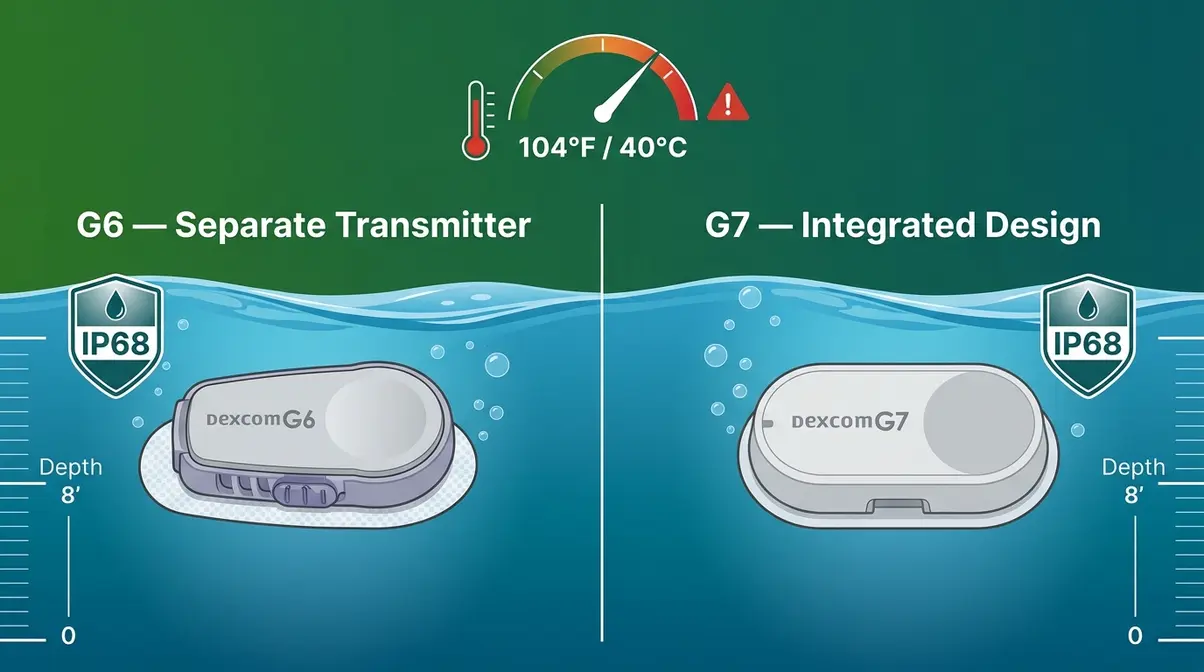
The short answer is yes — with important caveats. Both the Dexcom G6 and G7 are built to handle water, but a hot tub introduces two factors that a regular swim doesn’t: sustained heat and prolonged submersion. If you want to learn about using Dexcom in hot tubs safely, understanding the difference between those risks is what separates a confident soak from a stressful one.
How Waterproof Is the Dexcom G6 vs. G7?
Both sensors carry an IP68 rating — the industry standard for waterproofing. IP68 means a device can withstand submersion in water up to 8 feet (2.4 meters) deep for up to 24 hours without damage to the hardware.
According to Dexcom’s official FAQ, the G7 sensor is rated waterproof to 8 feet (2.4 meters) for up to 24 hours. The G6 carries the same IP68 rating, as confirmed by Dexcom’s G6 waterproof documentation.
Here’s the practical comparison:
| Feature | Dexcom G6 | Dexcom G7 |
|---|---|---|
| Water resistance rating | IP68 | IP68 |
| Max depth | 8 ft (2.4 m) | 8 ft (2.4 m) |
| Max submersion time | 24 hours | 24 hours |
| Transmitter waterproof? | Yes | Integrated (sensor + transmitter combined) |
| Receiver waterproof? | No | No |
| Operating temp range | 59–104°F (15–40°C) | 59–104°F (15–40°C) |
The key difference between the two models is structural: the G7 combines the sensor and transmitter into one piece, while the G6 uses a separate transmitter that snaps onto the sensor pod. Both are waterproof at the sensor site, but neither receiver (the handheld display device) is water-resistant. Keep it out of the water entirely.
“Both the G6 and G7 are rated waterproof to 8 feet for 24 hours — but their 104°F operating ceiling means hot tubs sit right at the safety boundary.”
Community reports from the r/dexcom subreddit consistently indicate that the sensor hardware itself survives hot tub use well. The bigger concern — the one that actually causes problems — is adhesive failure, not hardware failure.
False Highs and The Heat-Rise Distinction
This is the part no competitor article explains, and it’s genuinely important to understand before you soak.
When you sit in a hot tub, your body responds to the heat by increasing blood flow to your skin — a process called vasodilation (widening of blood vessels near the surface). This brings more warm, glucose-carrying blood closer to the sensor site. Your CGM (continuous glucose monitor) doesn’t measure blood glucose directly; it measures interstitial fluid (the fluid between your cells). In hot conditions, that interstitial fluid can temporarily show elevated glucose levels that don’t reflect what’s actually in your bloodstream.
This is The Heat-Rise Distinction: the critical difference between a sensor reporting a “fast rise” because of heat-driven vasodilation versus your blood sugar genuinely spiking. Confusing the two can lead to unnecessary insulin correction — which is dangerous.
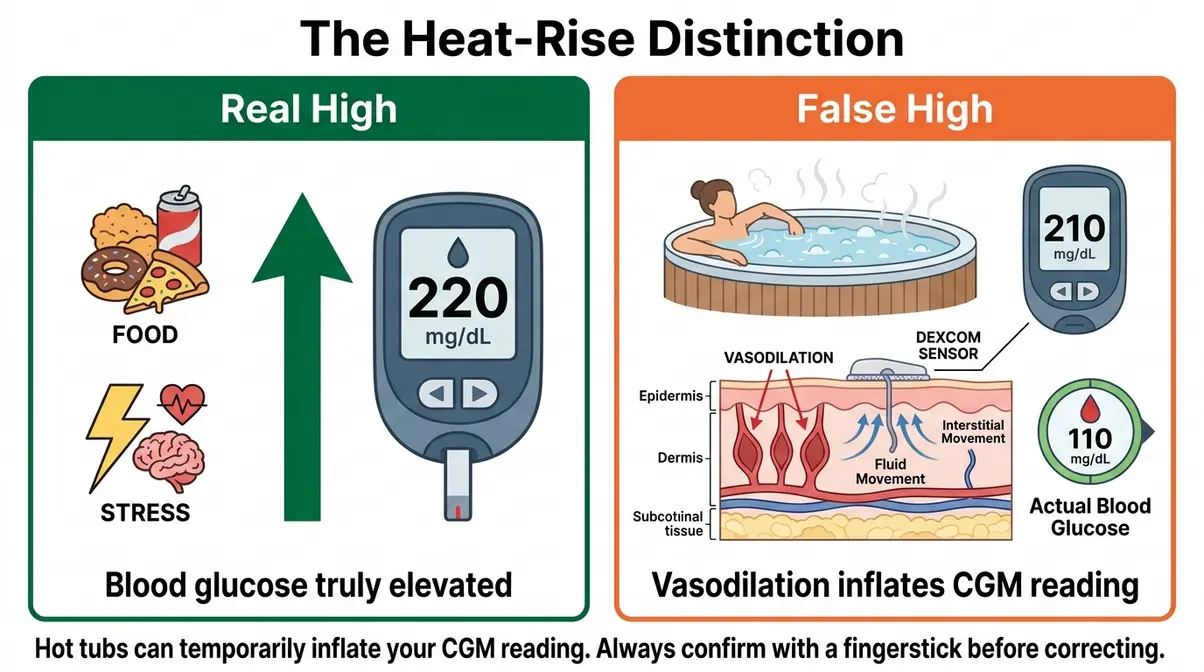
If your Dexcom shows a rapid rise while you’re soaking, always confirm with a fingerstick blood glucose test before taking any corrective action. This single habit can prevent a dangerous over-correction. Always consult your diabetes care team about your personal protocol for confirming readings during heat exposure.
Temperature Limits and Signal Loss: What to Watch For
The Consumer Product Safety Commission (CPSC) sets the maximum safe hot tub temperature at 104°F (40°C). Dexcom’s operating temperature range for both the G6 and G7 tops out at exactly 104°F (40°C). That means a hot tub dialed to its legal maximum sits right at the edge of your sensor’s certified operating range.
What happens if the water — or the air above it — pushes past that limit? Dexcom’s documentation notes that operating outside the temperature range may cause inaccurate readings or sensor errors. In practice, community reports from r/dexcom describe sensor “???” error codes appearing after extended soaks in very hot water, which typically resolve once the sensor cools down.
Practical rules to stay within safe limits:
- Keep the water at or below 104°F (40°C) — use your hot tub’s built-in thermometer
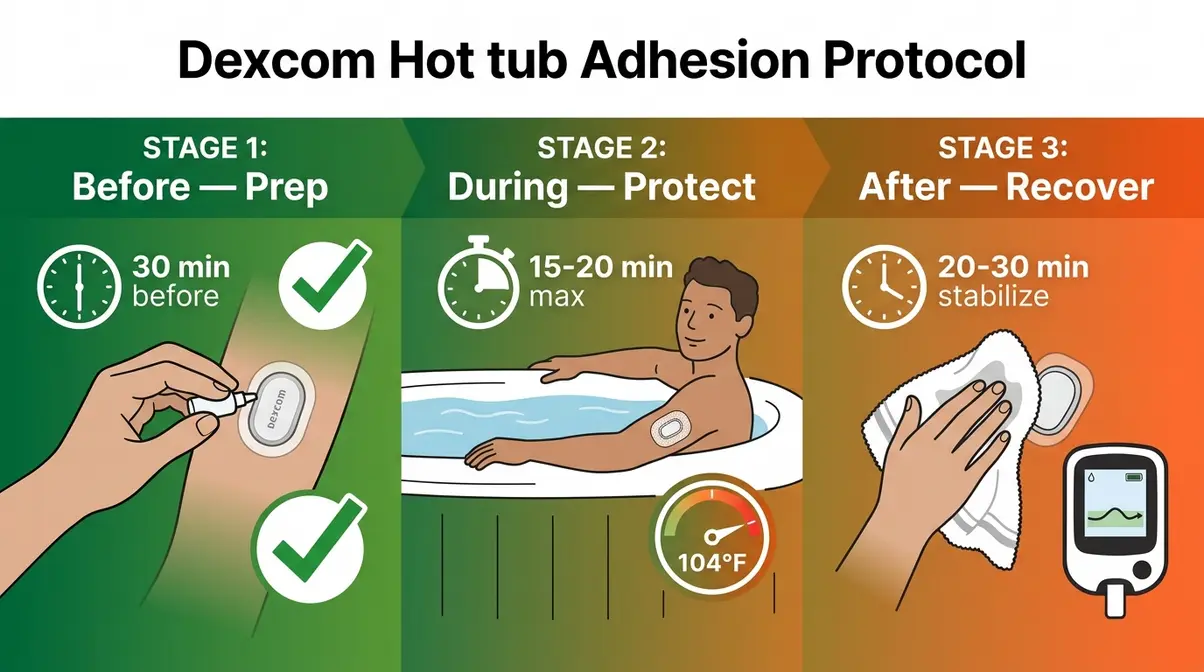
- Limit soaks to 15–20 minutes to reduce cumulative heat exposure on the sensor
- Exit if you see error codes (three question marks “???”) — let the sensor cool before re-entering
- Bluetooth signal can also weaken through water; keep your phone or receiver within 20 feet and above the waterline
What About the Receiver or Phone?
This is a common beginner misconception worth addressing clearly: the Dexcom receiver is NOT waterproof. Neither is your phone. The sensor on your body is rated IP68, but the display device is a standard consumer electronic with no water-resistance guarantee.
If you bring your phone to the hot tub — which most people do — keep it on a dry surface away from splashing. The G7 and G6 both transmit via Bluetooth, so your phone or receiver just needs to stay within range (roughly 20 feet / 6 meters in open air), not in the water with you. Set up your device on a towel or side table before you get in, and you’ll maintain continuous monitoring without risking a waterlogged phone.
How to Keep Your Dexcom Sensor Secure in a Hot Tub
Adhesion is your biggest practical challenge. Heat and prolonged water exposure both weaken the adhesive bond that holds your sensor to your skin — and a sensor that “fell right off” means a wasted 10-day session. The good news: a simple 3-step protocol dramatically reduces that risk.
Before You Soak: What to Know
Before you apply anything, two prerequisites make everything else work better:
- Wait at least 24 hours after inserting a new sensor before hot tub use. New sensors need time for the adhesive to fully bond to your skin. Soaking too soon is one of the most common reasons sensors fall off prematurely.
- Make sure your skin is clean and dry at the sensor site. Oils, lotions, and sweat all weaken the adhesive bond before you even get near the water.
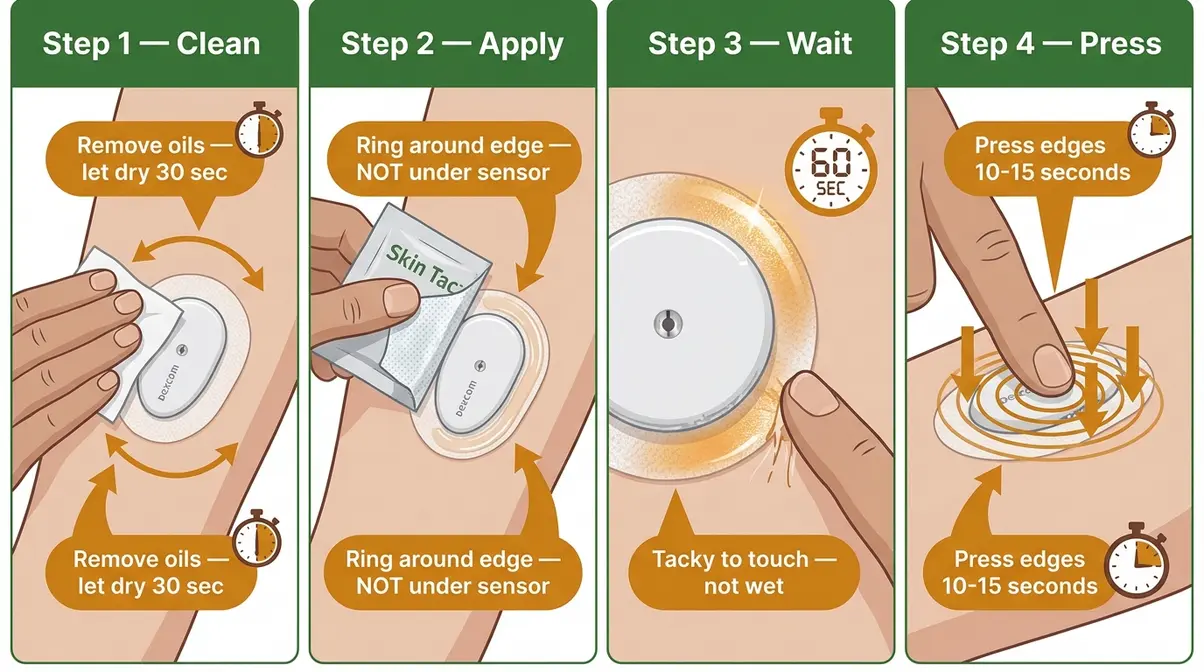
Step 1 — Prep Your Skin Before You Soak
Tools needed: Skin Tac liquid adhesive (or equivalent), alcohol wipe, 5 minutes
Total time: ~5 minutes, at least 30 minutes before entering the hot tub
- Wipe the area around your sensor with an alcohol wipe and let it dry completely (30 seconds). This removes skin oils that break down adhesive over time.
- Apply a thin ring of Skin Tac around the outer edge of your sensor patch — not under the sensor itself. Skin Tac is a liquid adhesive wipe that significantly reduces premature CGM detachment in high-moisture environments, according to an NIH clinical review of CGM adhesion strategies.
- Let it dry until tacky — about 60 seconds. It should feel sticky to the touch, not wet.
- Press the edges of the sensor patch firmly against your skin for 10–15 seconds to re-seal any lifting edges.
Why this matters: Heat expands skin slightly and increases perspiration, both of which push adhesive off from the edges inward. Reinforcing the perimeter before you soak stops that process at the source.
Step 2 — Apply a Protective Overpatch
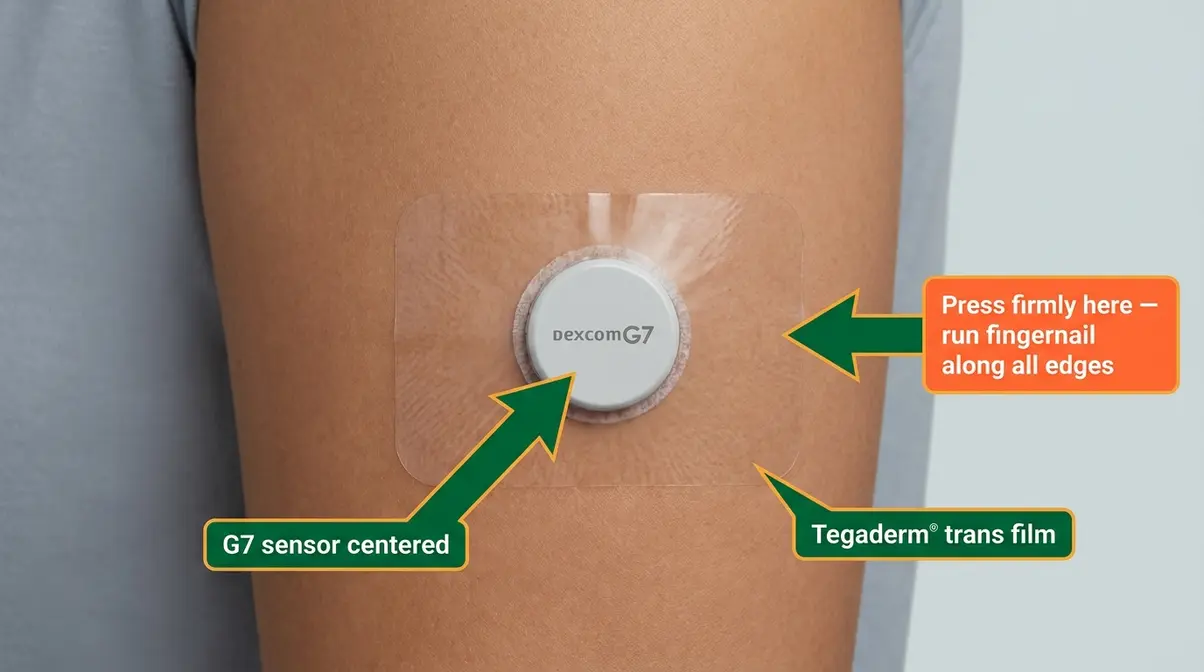
An overpatch is a thin, transparent adhesive patch (like a “clear patch over it”) that goes on top of your entire sensor, locking it in place like a second skin. This is your most effective defense against sensors falling off in hot water.
Recommended overpatches for hot tub use:
| Product | Size | Key Feature | Approx. Cost |
|---|---|---|---|
| SkinGrip | G6/G7 specific | Pre-cut to fit; water-resistant | ~$15 / 20 pack |
| Tegaderm (3M) | Universal | Medical-grade; very strong hold | ~$12 / 10 pack |
| Dexcom-branded overpatch | G7 specific | Official Dexcom product; easy to apply | ~$10 / 10 pack |
How to apply an overpatch:
- Center the overpatch over your sensor so the sensor sits in the middle of the patch.
- Peel the backing in sections — start from the center and smooth outward to avoid air bubbles.
- Press firmly from the center outward for 30 seconds, paying extra attention to edges.
- Run your fingernail along every edge to ensure full contact with skin.
The ADA’s Standards of Care emphasizes careful adhesive management during water activities for CGM users — overpatches are the most widely recommended method across clinical guidance and community consensus alike.
Step 3 — Care for Your Sensor After Soaking
What you do after the hot tub is just as important as what you do before. Heat and water leave your sensor’s adhesive temporarily softened, and how you dry and handle it in the next few minutes determines whether it stays put for the rest of its 10-day session.
Post-soak checklist:
- Pat dry — don’t rub. Use a soft towel and gently blot the sensor and surrounding skin. Rubbing creates friction that lifts edges.
- Check all edges of the overpatch. If any edge is lifting, press it back down firmly while the skin is still warm (warmth makes the adhesive more pliable and responsive).
- Avoid lotions or oils near the sensor site for at least an hour after soaking. These seep under edges and restart the adhesive failure process.
- Give your readings 20–30 minutes to stabilize after exiting the hot tub. Heat-induced vasodilation takes time to resolve, so readings immediately post-soak may still reflect The Heat-Rise Distinction effect rather than your true blood glucose.
Dexcom Recalls, Magnet Trick, and 80/20 Rule
Some Dexcom questions come up repeatedly in forums and search results that don’t fit neatly into the safety or adhesion categories. Here are clear, sourced answers to the three most common ones.
Why Is Dexcom Being Recalled?
Dexcom has issued recalls related to specific G6 and G7 receiver units — not the sensors themselves. According to the FDA’s official recall notice, Dexcom voluntarily recalled certain G6, G7, ONE, and ONE+ receiver devices due to a software issue that could cause the receiver to display incorrect glucose values without triggering an alert. This is a receiver-specific issue, not a sensor issue, and it does not affect the sensor’s waterproofing or adhesion performance.
If you use a smartphone app rather than the handheld receiver, this recall does not affect your monitoring. If you rely on the receiver device, check the FDA recall page and contact Dexcom directly to verify whether your unit is affected. Always consult your diabetes care team if you have concerns about your monitoring accuracy.
What Is the Dexcom Magnet Trick?
The “magnet trick” is a community-reported workaround discussed on forums like r/dexcom. The idea: placing a small magnet near a Dexcom transmitter (G6 specifically) can sometimes restart or extend a sensor session that the system has flagged as expired. This is done by some users to squeeze additional days out of a sensor beyond its official 10-day limit.
Important caveats: This is not endorsed or supported by Dexcom, and it is not medically approved. Community reports from r/dexcom describe mixed results — some users report continued accurate readings, others report degraded accuracy or no effect. Dexcom’s sensors are calibrated for their rated session length; accuracy beyond that window is not guaranteed. Do not rely on extended sessions for clinical decision-making. Always consult your diabetes care team before attempting any unofficial device modification.
What Is the 80/20 Rule for Dexcom?
The “80/20 rule” is informal community shorthand, not an official Dexcom guideline. As discussed in r/dexcom threads, it refers to a general observation that Dexcom CGM readings are considered accurate enough for clinical use when they fall within 20% of a fingerstick blood glucose reading — roughly 80% of the time under normal conditions. Some users apply this as a rule of thumb for deciding when to trust a CGM reading versus confirming with a fingerstick.
This is anecdotal community guidance, not medical advice. Dexcom’s official accuracy metric is MARD (Mean Absolute Relative Difference) — the G7 achieves a MARD of approximately 8.2%, meaning it is highly accurate under normal conditions. In hot tub scenarios, The Heat-Rise Distinction means readings may temporarily fall outside normal accuracy windows, making fingerstick confirmation especially important during and after soaking.
Hot Springs Filters and Maintenance
If you’re visiting a natural hot spring rather than a home or hotel hot tub, the same safety principles apply — but with one additional consideration: mineral content. Natural hot springs often contain sulfur, calcium, and other minerals at higher concentrations than treated hot tub water. These minerals can potentially affect the adhesive bond more aggressively than chlorinated water, though individual reports vary. Community reports from r/dexcom suggest applying an extra overpatch layer before visiting mineral-rich springs as a precaution.
For hot tub filter maintenance and water chemistry, the core rule is straightforward: a properly balanced hot tub (correct pH, chlorine or bromine levels within range) is no more corrosive to your sensor adhesive than a swimming pool. Extremely high sanitizer concentrations — which can occur in poorly maintained hot tubs — may degrade adhesive faster. If a hot tub smells strongly of chemicals, that’s a signal to check the water chemistry before soaking with your sensor.
If you need to access your equipment panel to check these filters, read our guide on how to unlock a Hot Springs hot tub before proceeding. For a deeper look at hot tub water care, including filter replacement schedules and chemical balancing, see our complete guide to hot tub maintenance.
Risks, Limitations, and When to Skip the Hot Tub
Keeping your dexcom hot tub safe means knowing when to stay out of the water entirely. Hot tubs and Dexcom sensors can coexist safely — but only when conditions are right. There are scenarios where the smart move is to stay out of the water, and knowing them in advance protects both your sensor and your health.
Common Mistakes That Can Damage Your Dexcom Sensor
Community reports from r/dexcom and clinical guidance both point to the same recurring errors:
Mistake 1: Soaking immediately after sensor insertion. New sensors need at least 24 hours for the adhesive to fully cure. Soaking within the first day is the leading cause of premature sensor detachment.
Mistake 2: Skipping skin prep. Entering a hot tub without cleaning and drying the sensor site first means the adhesive is already compromised before heat and water begin their work. Even a light layer of body lotion applied hours earlier can weaken the bond enough to cause failure.
Mistake 3: Using the wrong adhesive remover afterward. Some adhesive removers — particularly oil-based ones — leave a residue that prevents the next sensor from bonding properly. Use alcohol-based or sensor-safe removers only, and allow full drying time before applying a new sensor.
Mistake 4: Staying past the time limit. Exceeding 20–30 minutes per soak significantly increases both adhesive failure risk and heat exposure to the sensor. Set a timer.
Mistake 5: Correcting a “fast rise” without confirming. Acting on a heat-induced false high reading without a fingerstick confirmation is the most clinically significant mistake on this list. The Heat-Rise Distinction exists precisely to help you pause before correcting.
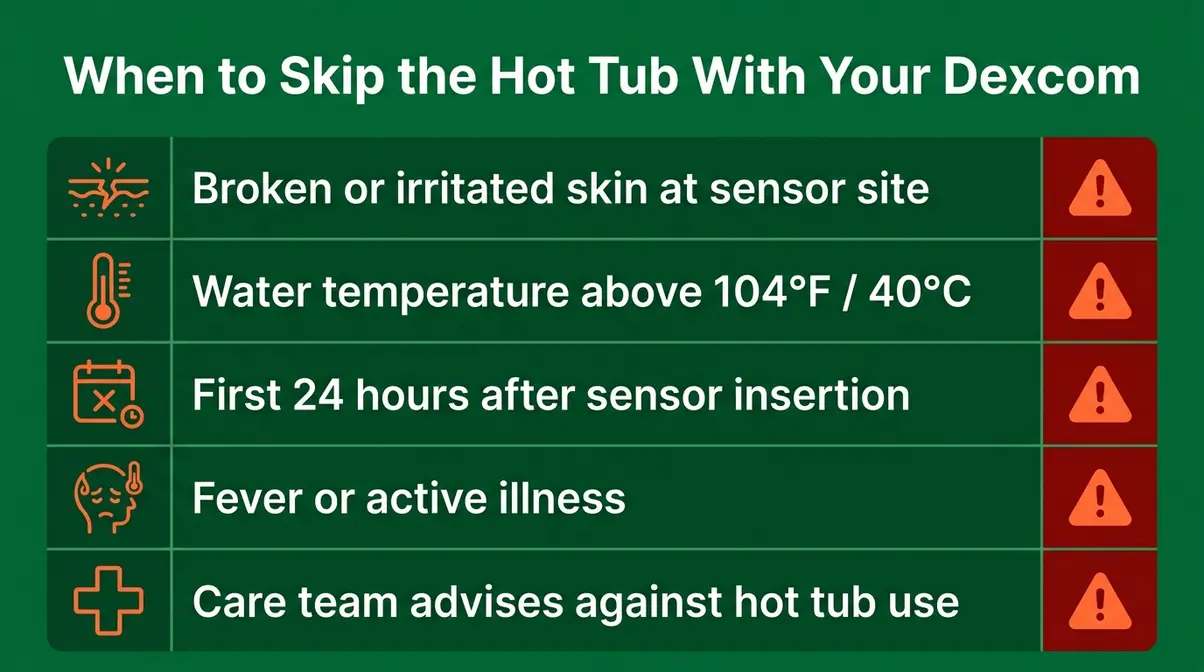
When to Avoid Hot Tub Use Altogether
Some situations make hot tub use with your Dexcom genuinely inadvisable:
- Broken or irritated skin at the sensor site. Water exposure can worsen skin damage and increase infection risk.
- Fever or illness. Fever already affects glucose readings; adding hot water heat compounds the distortion.
- First 24 hours after sensor insertion. As above — the adhesive hasn’t fully cured.
- Water temperature above 104°F (40°C). This exceeds both the CPSC safety recommendation and Dexcom’s operating temperature ceiling. Some private or commercial hot tubs run hotter than their dials indicate — verify with a separate thermometer if in doubt.
- If your diabetes care team has advised against hot tub use for cardiovascular or other health reasons. This is a medical decision that goes beyond CGM management.
Always consult your diabetes care team before using a hot tub if you have any concerns about how heat affects your glucose control or medication absorption.
Frequently Asked Questions
Can you go in a hot tub with Dexcom?
Yes, you can use a Dexcom sensor in a hot tub — both the G6 and G7 carry an IP68 waterproof rating to 8 feet (2.4 meters) for up to 24 hours. However, hot tubs add heat exposure that pools don’t, which can temporarily affect your glucose readings through a process called vasodilation. Always prep your skin, apply an overpatch, and limit soaks to 15–20 minutes to protect adhesion and reading accuracy.
Can a Dexcom G7 go in a hot tub?
The Dexcom G7 is rated waterproof to 8 feet (2.4 m) for up to 24 hours, making it safe for hot tub use from a hardware standpoint. The real concern is the operating temperature ceiling: both the G7 and G6 are rated to 104°F (40°C), which is the CPSC maximum for hot tubs. Keep water temperature at or below 104°F, use an overpatch to protect adhesion, and confirm any rapid glucose rise with a fingerstick before correcting.
Why is Dexcom being recalled?
Dexcom voluntarily recalled certain G6, G7, ONE, and ONE+ receiver devices due to a software issue that could display incorrect glucose values without triggering an alert, according to the FDA’s official recall notice. This recall affects the handheld receiver unit only — not the sensor or transmitter. If you use a smartphone app for monitoring, you are not affected. Check the FDA recall page and contact Dexcom to verify whether your specific device is included.
What is the Dexcom magnet trick?
The magnet trick is an unofficial, community-reported workaround discussed on forums like r/dexcom, where users place a small magnet near a G6 transmitter to attempt to restart or extend a sensor session past its 10-day limit. This method is not endorsed or supported by Dexcom, and accuracy beyond the rated session window is not guaranteed. Community reports from r/dexcom describe inconsistent results. Do not rely on extended sessions for clinical decisions — always consult your diabetes care team.
What is the 80/20 rule for Dexcom?
The 80/20 rule is informal community shorthand, not an official Dexcom guideline, referring to the general expectation that CGM readings fall within 20% of a fingerstick value roughly 80% of the time. The G7’s official accuracy metric (MARD) is approximately 8.2% under normal conditions — significantly better than the 80/20 framing suggests. During hot tub use, heat-induced false highs can temporarily push readings outside normal accuracy windows, making fingerstick confirmation especially important.
Protecting Your Sensor — and Your Peace of Mind
Both the Dexcom G6 and G7 are built to handle water — their IP68 rating covers 8 feet of submersion for up to 24 hours. Hot tubs are manageable with the right preparation. The critical insight to carry forward is The Heat-Rise Distinction: when your sensor shows a rapid rise during or after a soak, heat-driven vasodilation may be the cause, not a true blood sugar spike. Confirm with a fingerstick before correcting.
The 3-step adhesion protocol — skin prep with Skin Tac, overpatch application, and careful post-soak drying — addresses the real-world problem that most Dexcom users actually face in hot tubs: not hardware failure, but adhesive failure. Following those steps consistently means your 10-day sensor investment survives the soak intact.
Ultimately, keeping your dexcom hot tub safe comes down to managing heat exposure and protecting the adhesive. Before your next hot tub session, gather your Skin Tac and an overpatch, set a 15-minute timer, and keep your phone or receiver out of the water on a dry surface nearby. That’s the complete setup. For any questions about how heat specifically affects your glucose management or medication, bring this guide to your next appointment and review it with your diabetes care team — they can tailor the protocol to your individual situation.